Tuesday, February 22, 2011
VasLabs press announcement
Dear friends of VasLabs,
We shall thank you all who are using our products. We are also pleased to announce our progress of our most important released products as follows:
For Windows:
VasLook
Vaslook is a product that notifies you when you get an email. We are pleased that has over than 500 downloads, since it's an application only for yahoo emails. We know that this project fall behind, however you should expect some small updates and fixes by the end of March.
File Engineer
This product is in it's final version. It is the upgraded version of an older program called File Editor. The basic function that it does is hiding your files, but you can also use it for fast browsing through your files. It is fully stable and for that reason this project closed, but we still offer support on any problems you may have.
For Android:
Password Maker(Android Market)
We could write whole books about this product. Although it didn't reach in downloads our expectations, it is a high level security solution for both creating AND managing your passwords. Consider how many viruses you have got until now, and how many data got stolen from your drives even if you don't know it. It is not hard for a hacker to decrypt the file that the Password Manager you use saves your passwords. However, with this application, no data will be stolen because there isn't any. The idea of managing your passwords, is that you use the same Master Password each time, then you put the reason you want it, e.g. for www.gmail.com you put gmail, and then the length of the password.
We also use your phone data to produce unique passwords for each handset.
Anyway, we expect you to use this product and be safer than ever(that will be useful to us, since less friends will ask us what to do for their hijacked account).
OpapGames
Many people show their love for that application, especially Greeks. It is statistically the most popular application we ever made, having now more than 1500 downloads. You can expect an upgrade soon, that will contain more games collected from european countries.
These were the news of VasLabs in the context of our Applications.
We are creating a video advertisement too, and soon will be available on the blog and on youtube!
Thank You
The Manager
Vasilis Nicolaou
We shall thank you all who are using our products. We are also pleased to announce our progress of our most important released products as follows:
For Windows:
VasLook
Vaslook is a product that notifies you when you get an email. We are pleased that has over than 500 downloads, since it's an application only for yahoo emails. We know that this project fall behind, however you should expect some small updates and fixes by the end of March.
File Engineer
This product is in it's final version. It is the upgraded version of an older program called File Editor. The basic function that it does is hiding your files, but you can also use it for fast browsing through your files. It is fully stable and for that reason this project closed, but we still offer support on any problems you may have.
For Android:
Password Maker(Android Market)
We could write whole books about this product. Although it didn't reach in downloads our expectations, it is a high level security solution for both creating AND managing your passwords. Consider how many viruses you have got until now, and how many data got stolen from your drives even if you don't know it. It is not hard for a hacker to decrypt the file that the Password Manager you use saves your passwords. However, with this application, no data will be stolen because there isn't any. The idea of managing your passwords, is that you use the same Master Password each time, then you put the reason you want it, e.g. for www.gmail.com you put gmail, and then the length of the password.
We also use your phone data to produce unique passwords for each handset.
Anyway, we expect you to use this product and be safer than ever(that will be useful to us, since less friends will ask us what to do for their hijacked account).
OpapGames
Many people show their love for that application, especially Greeks. It is statistically the most popular application we ever made, having now more than 1500 downloads. You can expect an upgrade soon, that will contain more games collected from european countries.
These were the news of VasLabs in the context of our Applications.
We are creating a video advertisement too, and soon will be available on the blog and on youtube!
Thank You
The Manager
Vasilis Nicolaou
Sunday, February 20, 2011
Our md5 cracker!
Our md5 cracker is our new tool for recovering md5's. It will be available soon. For now look at that pictures and see its power:
Friday, February 18, 2011
Linux Lessons (another lesson) Aliases
Aliases is a strong utility in linux arsenal, which benefits the using of your linux machine. With aliases you can create simple "key phrases" which execute complicated and/or long commands. You can have a file with your aliases, or just create instant aliases in the terminal with a short life (until you close your terminal).
Let's see first how to create an instant alias, just for your current terminal session.
All actions were made in Ubuntu with GNOME as the desktop environment.
Open your terminal:

We are going to create an alias for a simple command: the command that change directory to our video files!!!
The path of the videos is: ~/Videos
The command to go there is: cd ~/Videos
We can just create an alias for going to that directory, with giving only the word videos. Like this:
alias videos="cd ~/Videos"
and press enter.
Now try it:
videos
press enter
Let's see another command which is longer and we would use it most of the times if it wasn't so big to write. The command that locks your screen which is (in gnome) :
gnome-screensaver-command -l
We've created this alias:
alias lock="gnome-screensaver-command -l"
Now try lock. (After that put your password and return here)
These are good but they have a disadvantage: They live short. What if you want to use them e.g for ever?
For this purpose you can create a file in your home directory with the appropriate name. The name of that file is found in another file in ~/.bashrc. Remember that you can view the file using less ~/.bashrc. The important part who says the name of the file is at the end of the .bashrc.
Here it is in our case:
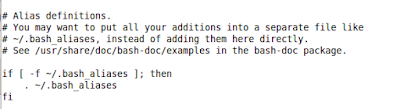
It's name is .bash_aliases.
Let's create that file. type:
touch .bash_aliases
Now your file is created but it's empty.
Let's put the aliases we looked at(for every new line press enter:
cat >>~/.bash_aliases
or use
nano >>~/.bash_aliases
(if you
alias videos="cd ~/Videos"
alias lock="gnome-screensaver-command -l"
^d
(The previous was ctrl+d which means that you won't send any more data)
Let us now give you some ideas for other aliases:
your favourite website:
alias vaslabs='firefox "http://www.vaslabs.blogspot.com"'
the shutdown and restart commands:
alias shutdown="sudo shutdown -P now"
alias restart="sudo shutdown -r now"
What other aliases can you think of? Send us if you want your aliases on vaslabsco@gmail.com


Let's see first how to create an instant alias, just for your current terminal session.
All actions were made in Ubuntu with GNOME as the desktop environment.
Open your terminal:

We are going to create an alias for a simple command: the command that change directory to our video files!!!The path of the videos is: ~/Videos
The command to go there is: cd ~/Videos
We can just create an alias for going to that directory, with giving only the word videos. Like this:
alias videos="cd ~/Videos"
and press enter.
Now try it:
videos
press enter
Let's see another command which is longer and we would use it most of the times if it wasn't so big to write. The command that locks your screen which is (in gnome) :
gnome-screensaver-command -l
We've created this alias:
alias lock="gnome-screensaver-command -l"
Now try lock. (After that put your password and return here)
These are good but they have a disadvantage: They live short. What if you want to use them e.g for ever?
For this purpose you can create a file in your home directory with the appropriate name. The name of that file is found in another file in ~/.bashrc. Remember that you can view the file using less ~/.bashrc. The important part who says the name of the file is at the end of the .bashrc.
Here it is in our case:

It's name is .bash_aliases.
Let's create that file. type:
touch .bash_aliases
Now your file is created but it's empty.
Let's put the aliases we looked at(for every new line press enter:
cat >>~/.bash_aliases
or use
nano >>~/.bash_aliases
(if you
alias videos="cd ~/Videos"
alias lock="gnome-screensaver-command -l"
^d
(The previous was ctrl+d which means that you won't send any more data)
Let us now give you some ideas for other aliases:
your favourite website:
alias vaslabs='firefox "http://www.vaslabs.blogspot.com"'
the shutdown and restart commands:
alias shutdown="sudo shutdown -P now"
alias restart="sudo shutdown -r now"
What other aliases can you think of? Send us if you want your aliases on vaslabsco@gmail.com


Tuesday, February 15, 2011
Triple test for Square!!!
This is a suggestion from Cleanthis Metaxas who wrote us on his email to check whether Recursive Functions are fast.
First we thing that they are usually slow, but we will check it for a specific problem: finding the square of an integer number.
Before that we have to inform you that recursive function is a useful tool in a programmers arsenal, in order to use dynamic programming for solving complicated problems.
We used 3 different pieces of code to find the fastest: Let's analyse them:
public class StraightTest
{
private static int sqr(int n)
{
return n*n;
}
public static void main(String[] args)
{
System.out.println(sqr(Integer.parseInt(args[0])));
}
}
------------------------------------------------------------------
This is a fast way of solving the problem and very very simple. It get's the number, multiplies it with itself and returns the result
public class ForTest
{
private static int sqr(int n)
{
int result = 1;
for (int i = 1; i<=2; i++) result *= n; return result; } public static void main(String[] args) { System.out.println(sqr(Integer.parseInt(args[0]))); } } ----------------------------------------------------------- This is a more general way of doing it in the aspect of finding any power of a number. Since we are looking for the square we need to loop only twice. public class RecursiveTest { private static int sqr(int n) { if (n == 0) return 0; else return sqr(n - 1) + 2*(n-1) + 1; } public static void main(String[] args) { System.out.println(sqr(Integer.parseInt(args[0]))); } } And this is the recursive function-> f(0) = 0, f(n+1) = f(n-1) + 2*(n-1) + 1
So it calls repeatedly itself until the whole result is found.
Seems slower than the others.
Out experiment will be done using the following numbers for each one:
0, 5, 100, 1000
But we see for this problem the disadvantage of that recursive function, as well as the for: they cannot return the square of a negative number. But this is totally fixable by using absolute so we skip that.
Let's observe our tests:
real 0m0.825s
user 0m0.528s
sys 0m0.244s
--------------------------
ForTest:
real 0m0.891s
user 0m0.564s
sys 0m0.228s
--------------------------
real 0m0.911s
user 0m0.560s
sys 0m0.220s
The sys time is that we have to look. Since 0 returns 0 at once, recursive method was the fastest.
However, somebody would expect for to be slower than just a multiplication. But maybe our results are not so accurate because of the println. Let't remove it and try again:
StraightTest:
real 0m0.774s
user 0m0.528s
sys 0m0.212s
--------------------------
ForTest:
real 0m0.766s
user 0m0.552s
sys 0m0.180s
--------------------------
RecursiveTest
real 0m0.782s
user 0m0.576s
sys 0m0.172s
Well, recursive should be faster because it uses the less operations for finding zero. Now let's
check the other numbers too:
real 0m0.780s
user 0m0.568s
sys 0m0.176s
--------------------------
ForTest:
real 0m0.766s
user 0m0.564s
sys 0m0.168s
--------------------------
RecursiveTest
real 0m0.773s
user 0m0.548s
sys 0m0.196s
So in general all results are pretty close. We can't be sure what is the fastest from those results:
All about computers are hypothesis if we do not know exactly how something works.
Java is a language that has a lot of noise, in the sense that, it interprets its bytecode on its virtual machine. Then garbage collector is also used, we don't know what happens exactly.
In our next experiment we'll use another language, so don't miss our article!
We should thank Cleanthis Metaxas for his idea.
You can also send us your experiments or ideas at: vaslabsco@gmail.com
First we thing that they are usually slow, but we will check it for a specific problem: finding the square of an integer number.
Before that we have to inform you that recursive function is a useful tool in a programmers arsenal, in order to use dynamic programming for solving complicated problems.
We used 3 different pieces of code to find the fastest: Let's analyse them:
public class StraightTest
{
private static int sqr(int n)
{
return n*n;
}
public static void main(String[] args)
{
System.out.println(sqr(Integer.parseInt(args[0])));
}
}
------------------------------------------------------------------
This is a fast way of solving the problem and very very simple. It get's the number, multiplies it with itself and returns the result
public class ForTest
{
private static int sqr(int n)
{
int result = 1;
for (int i = 1; i<=2; i++) result *= n; return result; } public static void main(String[] args) { System.out.println(sqr(Integer.parseInt(args[0]))); } } ----------------------------------------------------------- This is a more general way of doing it in the aspect of finding any power of a number. Since we are looking for the square we need to loop only twice. public class RecursiveTest { private static int sqr(int n) { if (n == 0) return 0; else return sqr(n - 1) + 2*(n-1) + 1; } public static void main(String[] args) { System.out.println(sqr(Integer.parseInt(args[0]))); } } And this is the recursive function-> f(0) = 0, f(n+1) = f(n-1) + 2*(n-1) + 1
So it calls repeatedly itself until the whole result is found.
Seems slower than the others.
Out experiment will be done using the following numbers for each one:
0, 5, 100, 1000
But we see for this problem the disadvantage of that recursive function, as well as the for: they cannot return the square of a negative number. But this is totally fixable by using absolute so we skip that.
Let's observe our tests:
Input = 0
StraightTest:real 0m0.825s
user 0m0.528s
sys 0m0.244s
--------------------------
ForTest:
real 0m0.891s
user 0m0.564s
sys 0m0.228s
--------------------------
real 0m0.911s
user 0m0.560s
sys 0m0.220s
The sys time is that we have to look. Since 0 returns 0 at once, recursive method was the fastest.
However, somebody would expect for to be slower than just a multiplication. But maybe our results are not so accurate because of the println. Let't remove it and try again:
StraightTest:
real 0m0.774s
user 0m0.528s
sys 0m0.212s
--------------------------
ForTest:
real 0m0.766s
user 0m0.552s
sys 0m0.180s
--------------------------
RecursiveTest
real 0m0.782s
user 0m0.576s
sys 0m0.172s
Well, recursive should be faster because it uses the less operations for finding zero. Now let's
check the other numbers too:
input = 5
Let's use a medium number let's say:StraightTest:
real 0m0.776s
user 0m0.572s
sys 0m0.168s
--------------------------
ForTest:
real 0m0.781s
user 0m0.548s
sys 0m0.196s
--------------------------
RecursiveTest
real 0m0.773s
user 0m0.564s
sys 0m0.176s
real 0m0.776s
user 0m0.572s
sys 0m0.168s
--------------------------
ForTest:
real 0m0.781s
user 0m0.548s
sys 0m0.196s
--------------------------
RecursiveTest
real 0m0.773s
user 0m0.564s
sys 0m0.176s
input = 100
StraightTest:
real 0m0.773s
user 0m0.576s
sys 0m0.168s
--------------------------
ForTest:
real 0m0.773s
user 0m0.540s
sys 0m0.196s
--------------------------
RecursiveTest
real 0m0.782s
user 0m0.540s
sys 0m0.208s
And use a big number:
StraightTest:real 0m0.773s
user 0m0.576s
sys 0m0.168s
--------------------------
ForTest:
real 0m0.773s
user 0m0.540s
sys 0m0.196s
--------------------------
RecursiveTest
real 0m0.782s
user 0m0.540s
sys 0m0.208s
And use a big number:
input = 1000
real 0m0.780s
user 0m0.568s
sys 0m0.176s
--------------------------
ForTest:
real 0m0.766s
user 0m0.564s
sys 0m0.168s
--------------------------
RecursiveTest
real 0m0.773s
user 0m0.548s
sys 0m0.196s
So in general all results are pretty close. We can't be sure what is the fastest from those results:
All about computers are hypothesis if we do not know exactly how something works.
Java is a language that has a lot of noise, in the sense that, it interprets its bytecode on its virtual machine. Then garbage collector is also used, we don't know what happens exactly.
In our next experiment we'll use another language, so don't miss our article!
We should thank Cleanthis Metaxas for his idea.
You can also send us your experiments or ideas at: vaslabsco@gmail.com
Thursday, February 10, 2011
Counting time (another test)
Continuing from yesterday we were curious to see if java is faster than python. we know that java is slower than languages that create executable files. But python runs code by interpreting line by line. The program is the same as yesterday.
We also now that big programs may differ from the results, but we want to see just simple one's, because those that are complicated have several ways of writing.
We wrote in python:
--------------------------
#!/usr/bin/env python
import sys
a=int(sys.argv[1])
b=int(sys.argv[2])
c=a + b
print c
------------------------
Save the file as Addition.py
Make it executable:
chmod a+x Addition.py
And in java:
---------------------------------
Public class Addition
{
public static void main(String[] args)
{
int a = Integer.parseInt(args[0]);
int b = Integer.parseInt(args[1]);
int c = a + b;
System.out.println(c);
}
}
-------------------------------
Surely python looks shorter. We run the script we mentioned yesterday:
for python:
time for ((i=1;i<=10;i++)); do
Addition.py $i $i
done
for java:
time for ((i=1;i<=10;i++)); do
java Addition $i $i
done
-----------------------------------------
Results:
Python:
real 0m0.156s
user 0m0.080s
sys 0m0.064s
Java:
real 0m0.784s
user 0m0.564s
sys 0m0.200s
On previous article we haven't explained time.
The sys time is the important thing since it is the time that the process kept cpu busy.
So
Python is faster. The difference is very well considered!!! Or was it the print out which is slow?
Let's see again:
We removed the print line of each code.
Here are the results:
real 0m0.164s
user 0m0.112s
sys 0m0.020s
real 0m0.827s
user 0m0.576s
sys 0m0.188s
Final conclusion:
Print out takes an amazing amount of time.
Python is amazingly faster than Java.
What are your experiments? Share them with us on: vaslabsco@gmail.com
We also now that big programs may differ from the results, but we want to see just simple one's, because those that are complicated have several ways of writing.
We wrote in python:
--------------------------
#!/usr/bin/env python
import sys
a=int(sys.argv[1])
b=int(sys.argv[2])
c=a + b
print c
------------------------
Save the file as Addition.py
Make it executable:
chmod a+x Addition.py
And in java:
---------------------------------
Public class Addition
{
public static void main(String[] args)
{
int a = Integer.parseInt(args[0]);
int b = Integer.parseInt(args[1]);
int c = a + b;
System.out.println(c);
}
}
-------------------------------
Surely python looks shorter. We run the script we mentioned yesterday:
for python:
time for ((i=1;i<=10;i++)); do
Addition.py $i $i
done
for java:
time for ((i=1;i<=10;i++)); do
java Addition $i $i
done
-----------------------------------------
Results:
Python:
real 0m0.156s
user 0m0.080s
sys 0m0.064s
Java:
real 0m0.784s
user 0m0.564s
sys 0m0.200s
On previous article we haven't explained time.
The sys time is the important thing since it is the time that the process kept cpu busy.
So
Python is faster. The difference is very well considered!!! Or was it the print out which is slow?
Let's see again:
We removed the print line of each code.
Here are the results:
real 0m0.164s
user 0m0.112s
sys 0m0.020s
real 0m0.827s
user 0m0.576s
sys 0m0.188s
Final conclusion:
Print out takes an amazing amount of time.
Python is amazingly faster than Java.
What are your experiments? Share them with us on: vaslabsco@gmail.com
Subscribe to:
Posts (Atom)


